> For the complete documentation index, see [llms.txt](https://docs.sprinthub.com/llms.txt). Markdown versions of documentation pages are available by appending `.md` to page URLs; this page is available as [Markdown](https://docs.sprinthub.com/en/topics/relate/automation-flows/common-questions/automation-flow-monitoring-the-flow.md).
# Automation Flow - Monitoring the Flow
This step is important to ensure that your automation works correctly and achieves the desired results.
After creating and configuring your automation flow, reviewing all the details, it's time to **activate it**;
The option '**Published**', will keep your automation flow activated.
**Before** sending emails or messages to your contact list, it is highly recommended to perform **send tests**. This allows you to check formatting, links, and content to ensure everything is working as expected.
The tests are sent to an email address or WhatsApp *of your choice* so you can see how the emails will be received by the recipients.
After activation, you can monitor the automation flow in real time.
Click on the flow you want to monitor;
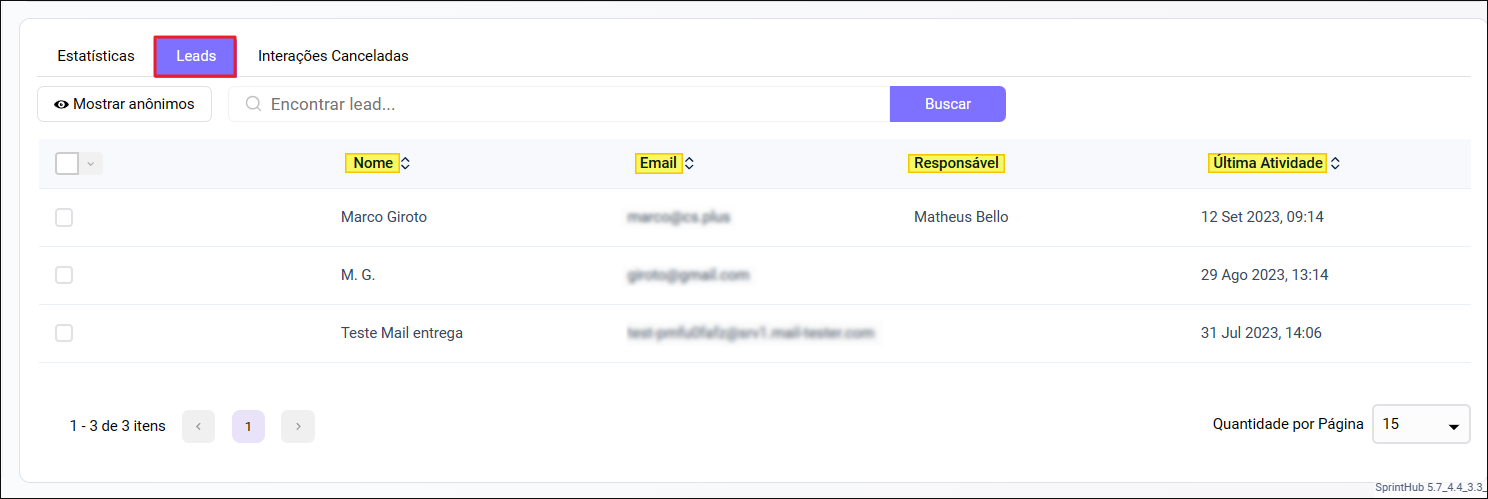
You will have access to essential data, such as **recent activity**, **statistics**, **leads** and you will also be able to **edit the dates**.
In the **statistics**, you will find a preview of your automation flow, with detailed statistics divided into each specific block.
In the leads section, you will find all the Leads that went through the flow. You will see important data such as Email, Name, Owner, and the Last activity.
In the canceled interactions section, you will find the flows that encountered errors or were manually interrupted.
Using the data and metrics collected during monitoring, it is recommended to consider adjustments and optimizations to your automation flow.
[**Learn how to create Automation Flows.**](/en/topics/relate/automation-flows.md)
---
# Agent Instructions
This documentation is published with GitBook. GitBook is the documentation platform designed so that both humans and AI agents can read, navigate, and reason over technical content effectively. Learn more at gitbook.com.
## Querying This Documentation
If you need additional information that is not directly available in this page, you can query the documentation dynamically by asking a question.
Perform an HTTP GET request on the current page URL with the `ask` query parameter, and the optional `goal` query parameter:
```
GET https://docs.sprinthub.com/en/topics/relate/automation-flows/common-questions/automation-flow-monitoring-the-flow.md?ask=&goal=
```
`ask` is the immediate question: it should be specific, self-contained, and written in natural language.
`goal` is optional and describes the broader end goal you are ultimately trying to accomplish on behalf of the user. GitBook uses it to tailor the answer towards what is most useful for that goal.
The response will contain a direct answer to the question and relevant excerpts and sources from the documentation.
Use this mechanism when the answer is not explicitly present in the current page, you need clarification or additional context, or you want to retrieve related documentation sections.