# Automatic Selectors

## What are they?

Automatic Selectors are identifiers that allow the flow to recognize entities linked to the contact, such as Tasks, Opportunities and Service Tickets.

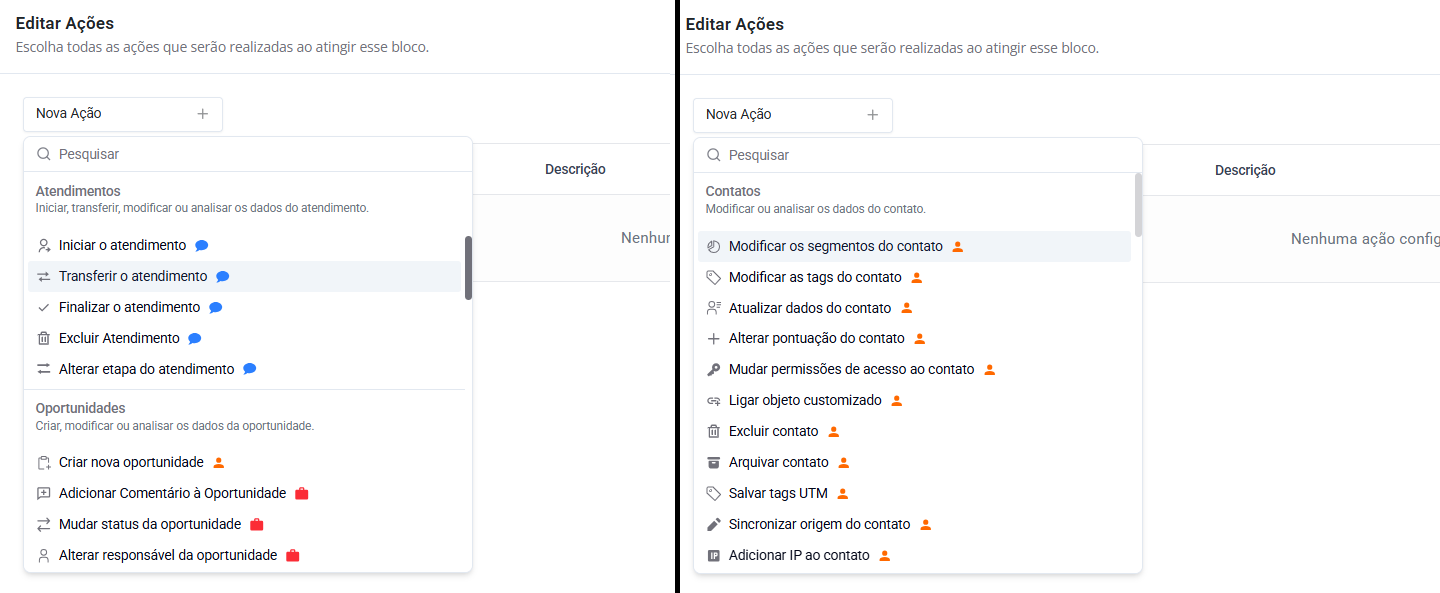
When you activate one of these selectors within an Automation Flow, specific triggers, conditions and actions for that category become usable. Normally, the flow operates only at the contact level, but that changes when a selector is enabled.

For example, by enabling the Service Ticket Automatic Selector and choosing the option "use the contact's most recent ticket", you are defining exactly which ticket the flow should consider. This is important to avoid ambiguities in situations where the same contact has more than one simultaneous ticket, such as two tickets on different WhatsApp accounts.

From there, actions like "Transfer the ticket" start to work within the flow. This allows automatically distributing the ticket to SAC 360º users or even changing its stage through the Automation Flow.

<div data-with-frame="true"><figure><img src="/files/4e80270ccf733ba0d1eff1c21568155ae890e08c" alt=""><figcaption><p><em>Automatic Selectors, on the 'Edit' screen of the Automation Flow.</em></p></figcaption></figure></div>

<div data-with-frame="true"><figure><img src="/files/450a60b8894a530e968ebb9ab50bbc5904bd5c35" alt=""><figcaption><p><em>Example of various actions within the Automation Flow.</em></p></figcaption></figure></div>

## Practical example: Checking Old Opportunities

An automation flow can be triggered from any point in SprintHub, such as form actions, extra actions via Webhook or internal CRM automations.

In the example below, the flow performs a sequence of checks using the condition "**Opportunity lifetime**" for the funnel of *Orders* to identify customers who placed their last order more than three months ago. If this condition is met, the system automatically sends a message with an exclusive discount coupon for recurring customers and, shortly after, creates a new opportunity in the *Remarketing*.

It is triggered via a Webhook, checking at the moment a new order is created in an external platform and starting the automation from that event.

<div data-with-frame="true"><figure><img src="/files/270def77aad1de1d27e57ff3a09c1df14670e630" alt=""><figcaption><p><em>Extra action of 'Change automation flow'.</em></p></figcaption></figure></div>

<div data-with-frame="true"><figure><img src="/files/fb4fb86c6973981131db030eda71eaefe626bd8f" alt=""><figcaption><p><em>Within the 'Coupon and Remarketing' Automation Flow.</em></p></figcaption></figure></div>


---

# Agent Instructions: Querying This Documentation

If you need additional information that is not directly available in this page, you can query the documentation dynamically by asking a question.

Perform an HTTP GET request on the current page URL with the `ask` query parameter:

```
GET https://docs.sprinthub.com/en/topics/relate/automation-flows/automatic-selectors.md?ask=<question>
```

The question should be specific, self-contained, and written in natural language.
The response will contain a direct answer to the question and relevant excerpts and sources from the documentation.

Use this mechanism when the answer is not explicitly present in the current page, you need clarification or additional context, or you want to retrieve related documentation sections.