> For the complete documentation index, see [llms.txt](https://docs.sprinthub.com/llms.txt). Markdown versions of documentation pages are available by appending `.md` to page URLs; this page is available as [Markdown](https://docs.sprinthub.com/en/topics/convert/url-shorteners.md).
# URL Shorteners
Create shortened and tracked links with your domain for any URL on the web.
To shorten your URL, follow the step-by-step guide:
Click on '**Link**' and then on '**URL Shorteners**'.
Then click on '**New**';
Set up your URL;
**Published**: To keep the URL **active** click 'Yes' if you want to **deactivate it** click 'No'.
**First name**: Define a name for the URL.
**Alias**: Enter what you want to appear after the slash (/) in the URL. \
*Example*: *`https://www.example.com/product`* . In the example, the "**Product**" is the Alias.
If you leave the field blank, the system will automatically create an alias.
**Original URL**: Enter the URL to which the lead will be redirected after clicking the shortener.
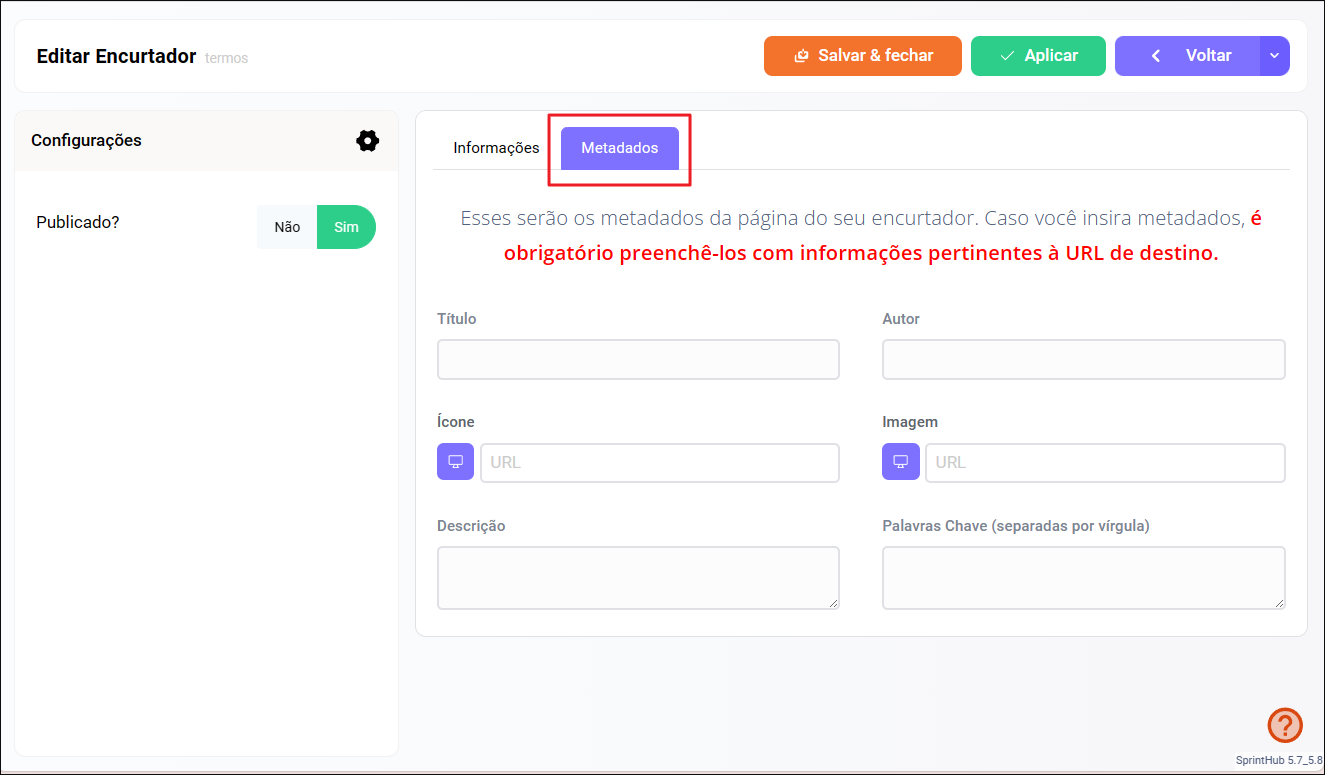
**Metadata**: Metadata provides additional information about the URL.
**Title**: This title is usually displayed in the browser tab and on search engine results pages.
**Icon**: It is a small icon usually displayed in the browser tab next to the page title or in the address bar.
**Image**: The featured image is a specific image that can be associated with a web page, usually used when the page is shared on social media, in messages, or in search results.
**Author**: The page author can be specified as part of the URL metadata, especially on sites where multiple people contribute to the content.
**Description**: The description is a brief summary of the web page content.
**Keywords**: Keywords are relevant terms or phrases that describe the page content.
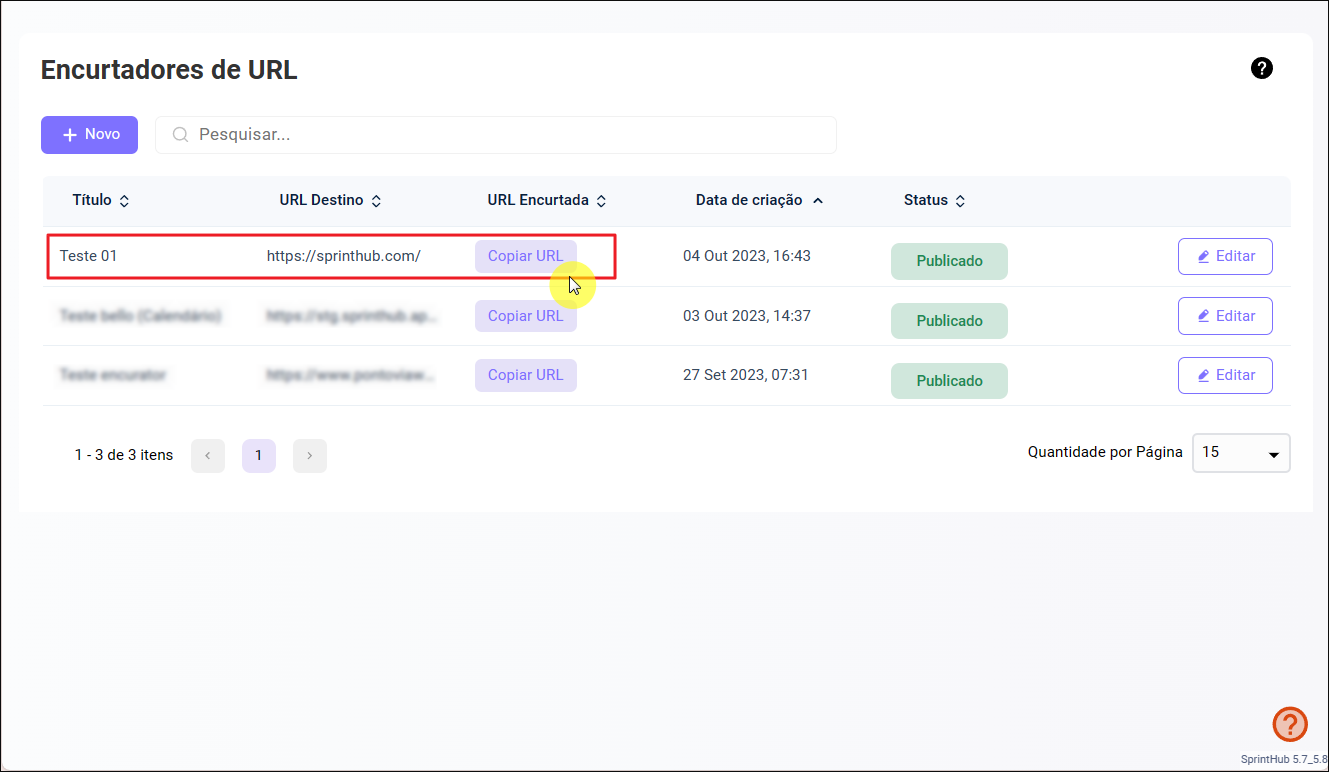
After configuring and adding all the necessary information, click on '**Save and Close**', copy the link to your URL, and it will be ready to be sent!
## To view click data and identify the Leads who performed the action:
* Click on the shortened URL without editing it;
* The statistics area will display information about clicks, Leads, and recent activity. In addition, you can check the Lead history to verify whether they clicked the URL and which link was accessed.
{% hint style="info" %}
*In addition to identified Leads, it is also possible to view anonymous and archived Leads. Anonymous Leads are those captured through tracking, but that do not have enough data, such as name or WhatsApp, to be identified.*
{% endhint %}
### Sending a shortened URL to an identified Lead:
In cases where the URL is sent by SprintHub via WhatsApp messages or email, it is necessary to add a token to the end of the original URL to identify the Lead who clicked the link.
```
?lid={contactfield=id}
```
Example:
The use of the identification token in the shortened URL is essential to accurately track Lead interactions. It allows each click to be linked to the corresponding Lead, ensuring that all actions are recorded in the history in an automated and organized way. This practice improves the monitoring of Lead behavior and facilitates strategic decision-making based on reliable data.
---
# Agent Instructions
This documentation is published with GitBook. GitBook is the documentation platform designed so that both humans and AI agents can read, navigate, and reason over technical content effectively. Learn more at gitbook.com.
## Querying This Documentation
If you need additional information that is not directly available in this page, you can query the documentation dynamically by asking a question.
Perform an HTTP GET request on the current page URL with the `ask` query parameter, and the optional `goal` query parameter:
```
GET https://docs.sprinthub.com/en/topics/convert/url-shorteners.md?ask=&goal=
```
`ask` is the immediate question: it should be specific, self-contained, and written in natural language.
`goal` is optional and describes the broader end goal you are ultimately trying to accomplish on behalf of the user. GitBook uses it to tailor the answer towards what is most useful for that goal.
The response will contain a direct answer to the question and relevant excerpts and sources from the documentation.
Use this mechanism when the answer is not explicitly present in the current page, you need clarification or additional context, or you want to retrieve related documentation sections.