> For the complete documentation index, see [llms.txt](https://docs.sprinthub.com/llms.txt). Markdown versions of documentation pages are available by appending `.md` to page URLs; this page is available as [Markdown](https://docs.sprinthub.com/en/topics/relate/message-templates-meta/message-templates-whatsapp-api.md).
# Message Templates - WhatsApp API
Creating message templates is a fundamental step to automate and streamline communication with your leads and customers. At SprintHub, this process is simple and intuitive, allowing full customization and the use of dynamic variables for more humanized messages.
### **Step-by-Step to Create a Template**
1. **Access the Templates Menu:**
* Go to **System Settings** > **Message Templates (Meta)**.
2. **Click on “New Template”:**
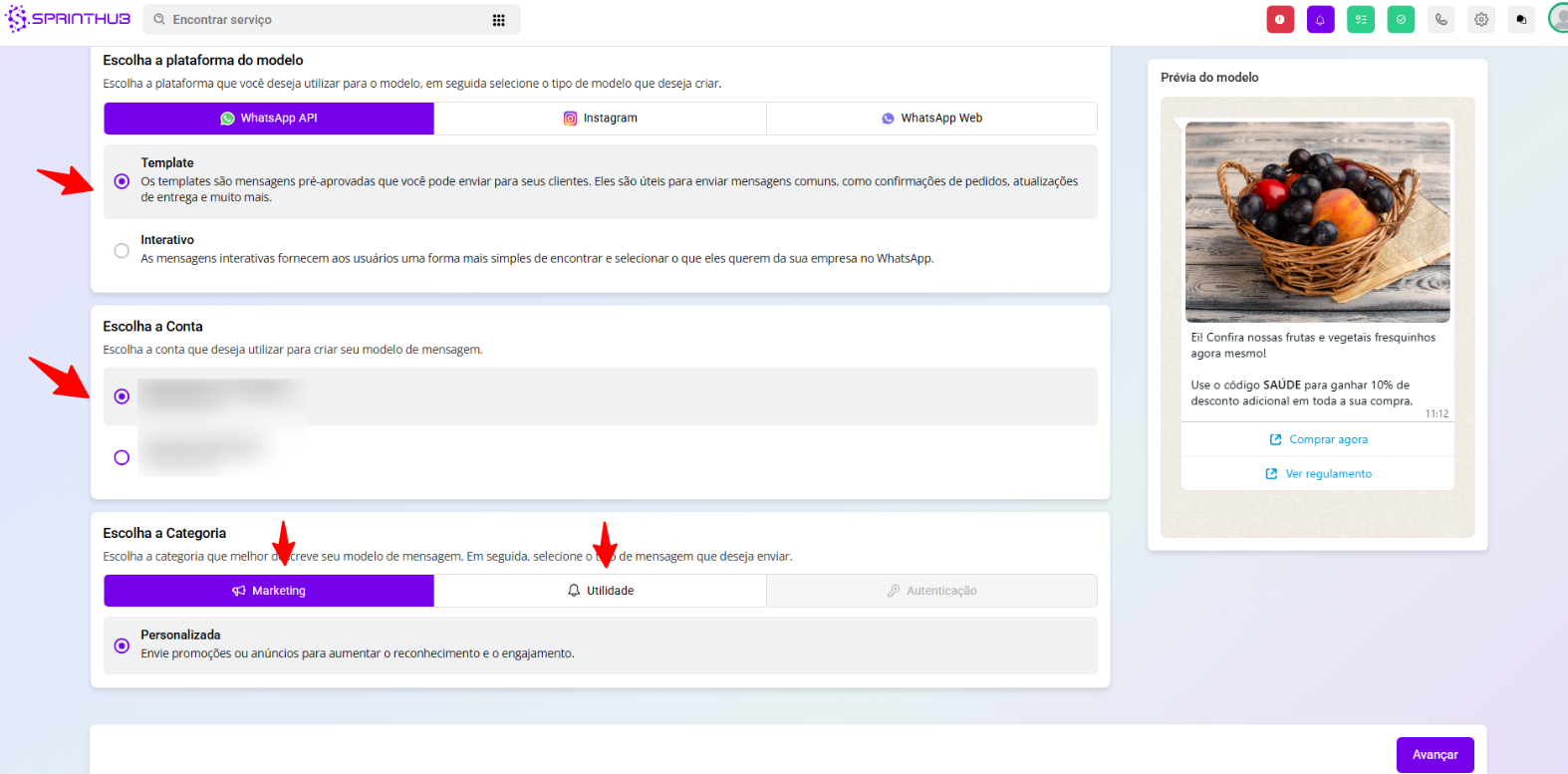
* Select the platform (WhatsApp API, Instagram, or WhatsApp Web).
3. **Select the Account and Category:**
* Choose the message type: **Template** (pre-approved messages) or **Interactive** (for greater user interaction).
* Choose the linked WhatsApp account.
* Define the message category:
* **Marketing:** For promotions, launches, and sales actions.
* **Utility:** For appointment confirmations, order updates, and important information.
* **Authentication:** Used to send verification codes (2FA).
1. **Configure the Message Content:**
* **Header:** Can be text, image, or document.
* **Body:** Enter the main content of the message, and you can use variables (e.g.: {{1}} for the contact's name).
* **Footer (optional):** Additional information or notes.
2. **Add Buttons:**
* **Call-to-Action Buttons:**
* **Visit the website:** Directs the user to an external link.
* **Call:** Allows making a direct call.
* **Quick Reply Buttons:**
* **Custom:** Quick replies defined by the company.
* **Cancel Marketing:** Option for the customer to stop receiving marketing messages.
3. **Preview and Send for Review:**
* After completing the setup, review the preview and click **Send for review**.
* Wait for Meta approval before you start using the template.
***
### **Difference Between Marketing and Utility Templates**
| **Category** | **Purpose** | **Usage Examples** |
| ------------ | ---------------------------------------------------------- | ---------------------------------------------------------- |
| Marketing | Promote products, generate sales, and publicize campaigns. | Product launch, special promotions, discount coupons. |
| Utility | Send important or transactional information. | Appointment confirmation, order update, payment reminders. |
> **Important:**\
> Messages of **Marketing** require prior customer consent, while those of **Utility** are generally part of the transactional relationship.
***
### **Tips to Increase Delivery and Engagement Rates:**
* Use clear call-to-action buttons.
* Personalize your messages with dynamic variables (e.g.: customer name).
* Offer the option to **Cancel Marketing** to reduce blocks and maintain a good account reputation.
* Test different content approaches to understand what generates the most interaction.
---
# Agent Instructions
This documentation is published with GitBook. GitBook is the documentation platform designed so that both humans and AI agents can read, navigate, and reason over technical content effectively. Learn more at gitbook.com.
## Querying This Documentation
If you need additional information that is not directly available in this page, you can query the documentation dynamically by asking a question.
Perform an HTTP GET request on the current page URL with the `ask` query parameter, and the optional `goal` query parameter:
```
GET https://docs.sprinthub.com/en/topics/relate/message-templates-meta/message-templates-whatsapp-api.md?ask=&goal=
```
`ask` is the immediate question: it should be specific, self-contained, and written in natural language.
`goal` is optional and describes the broader end goal you are ultimately trying to accomplish on behalf of the user. GitBook uses it to tailor the answer towards what is most useful for that goal.
The response will contain a direct answer to the question and relevant excerpts and sources from the documentation.
Use this mechanism when the answer is not explicitly present in the current page, you need clarification or additional context, or you want to retrieve related documentation sections.