> For the complete documentation index, see [llms.txt](https://docs.sprinthub.com/llms.txt). Markdown versions of documentation pages are available by appending `.md` to page URLs; this page is available as [Markdown](https://docs.sprinthub.com/estrategias/tokens/utilizando-tokens-de-variaveis-dentro-do-chatbot.md).
# Utilizando Tokens de Variáveis dentro do Chatbot
Como criar variáveis e usar tokens para transferir dados entre blocos e ações.
## Criando uma variável
As variáveis em um chatbot são utilizadas para armazenar dados temporariamente, permitindo que essas informações sejam acessadas e reutilizadas em momentos posteriores dentro do fluxo. No entanto, esses dados permanecem disponíveis apenas durante a execução do chatbot, ou seja, não são persistidos após o término da interação.
Para salvar uma resposta em uma variável, é necessário primeiro criar a variável no campo **"Salvar resposta em uma variável"**, disponível no bloco **"Enviar Pergunta"**.
Salvando resposta do lead em uma variável.
## Utilizando token da variável - Bloco Enviar Mensagem
O token segue o formato `{var=Nome Pet}`, com chaves, a palavra **`var`** e o nome da variável após o sinal de igual (`=`). No momento do envio da mensagem, o token será substituído pela variável preenchida pelo lead.
Token dentro do bloco 'Enviar Mensagem'.
## Utilizando token da variável - Ação de Enviar Webhook
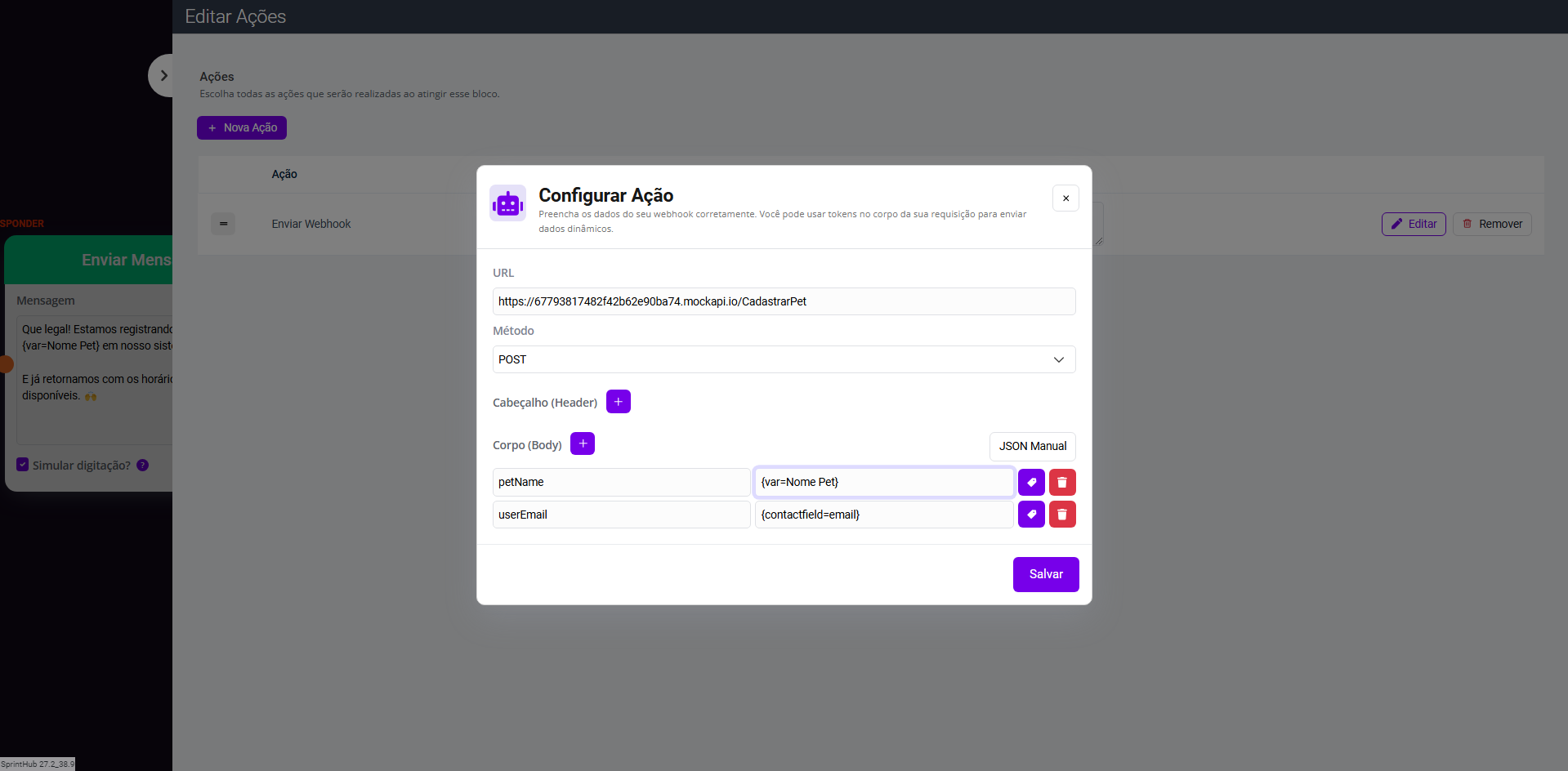
O token de variável pode ser usado em diversas ações, como na ação **"Enviar Webhook"** , para enviar dados para uma plataforma externa.
No caso abaixo, está sendo enviado um webhook contendo o e-mail cadastrado do lead, e o nome do pet, que foi salvo através da variável.
Token dentro da ação 'Enviar Webhook'.
---
# Agent Instructions
This documentation is published with GitBook. GitBook is the documentation platform designed so that both humans and AI agents can read, navigate, and reason over technical content effectively. Learn more at gitbook.com.
## Querying This Documentation
If you need additional information that is not directly available in this page, you can query the documentation dynamically by asking a question.
Perform an HTTP GET request on the current page URL with the `ask` query parameter, and the optional `goal` query parameter:
```
GET https://docs.sprinthub.com/estrategias/tokens/utilizando-tokens-de-variaveis-dentro-do-chatbot.md?ask=&goal=
```
`ask` is the immediate question: it should be specific, self-contained, and written in natural language.
`goal` is optional and describes the broader end goal you are ultimately trying to accomplish on behalf of the user. GitBook uses it to tailor the answer towards what is most useful for that goal.
The response will contain a direct answer to the question and relevant excerpts and sources from the documentation.
Use this mechanism when the answer is not explicitly present in the current page, you need clarification or additional context, or you want to retrieve related documentation sections.