> For the complete documentation index, see [llms.txt](https://docs.sprinthub.com/llms.txt). Markdown versions of documentation pages are available by appending `.md` to page URLs; this page is available as [Markdown](https://docs.sprinthub.com/en/topics/system-settings/account-settings/whatsapp-api/official-whatsapp-api-errors/error-200-you-do-not-have-the-necessary-permissions-to-send-messages-on-behalf-of-this-whatsapp.md).
# Error (#200): “You do not have the necessary permissions to send messages on behalf of this WhatsApp
This error occurs when SprintHub tries to send messages via **WhatsApp API**, but the user, the app, or the Business Manager itself **do not have all the permissions required by Meta**.
Below are all the causes, solutions, and **required assignments of the SprintHub partner** to ensure everything works without errors.
***
## 🚨 Why does error (#200) appear?
Meta blocks sending when any of these permissions is missing:
1. **Invalid, expired token, or missing required scopes**
2. **User without full control of the WABA**
3. **User without full control of the Business Manager (including financial)**
4. **Conflict caused by switching providers without disconnecting the previous one**
5. **SprintHub partner without full permissions granted in the BM**
6. **WhatsApp API app not authorized on the account**
***
## 🔐 Required permissions for everything to work
The WhatsApp API integration requires **three levels of permission**:
***
## ✔️ 1. User permissions (the person performing the integration)
The user who generates the token and connects the WhatsApp API must have:
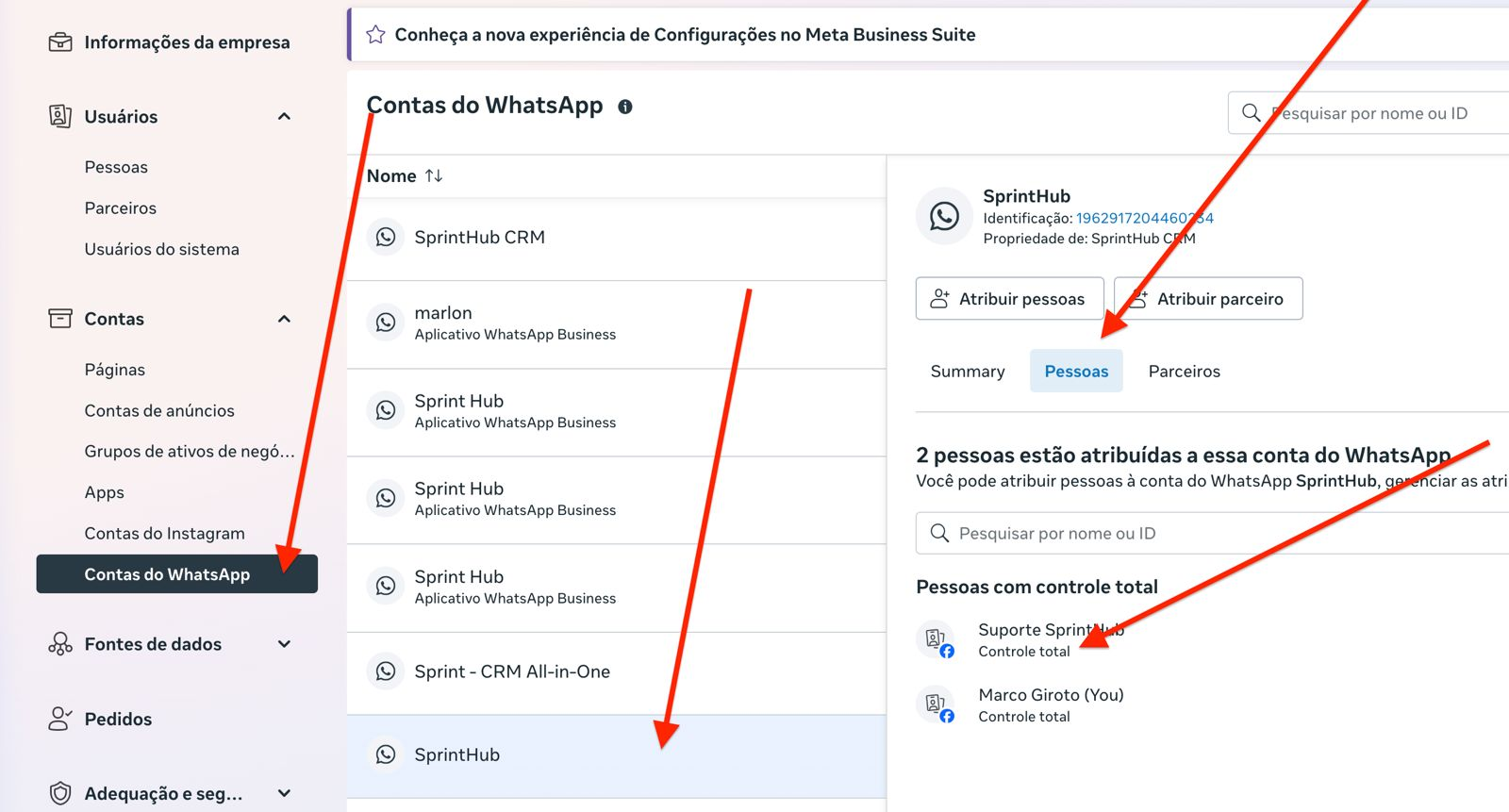
#### 🟩 **A) Full control in the WhatsApp Account (WABA)**
Path:\
**Business Settings → Accounts → WhatsApp Accounts → People**
Required permission:\
**✔ Full control**
***
#### 🟩 **B) Full control in the Business Manager (including financial)**
Path:\
**Business Settings → Users → People → BM Permissions**
Required permission:\
**✔ Business Manager admin access**\
(including financial area)
Without this, Meta does not authorize:
* Generation of valid tokens
* Provider configuration
* Advanced API permissions
* WABA management
***
## ✔️ 2. SprintHub partner permissions (essential!)
SprintHub is added as **a partner** in the client's Business Manager.\
For the integration to work without errors, the partner needs to have the permissions **full**.
In the client's BM:
Path:\
**Business Settings → Accounts → Partners**
Select the **SprintHub partner** and enable:
#### 🟦 Required partner permissions:
**✔ Full control over the WhatsApp account**
* Manage settings
* Manage numbers
* Manage templates
* Manage assignments
* Send messages on behalf of the WABA
**✔ Full access to the Business Manager**
* Assets
* Pixels
* Accounts
* Integrations
* Financial items required for the WABA
**✔ Administrative access to linked assets**
* WhatsApp accounts
* Linked apps
* Catalogs (if used)
> 🔎 **Important:**\
> If the SprintHub partner does not have all these permissions, the API simply **does not authorize sending**, even if the local user has full control.
***
## ✔️ 3. WhatsApp API App permissions
The app you are using to generate the token must have:
* `whatsapp_business_messaging`
* `whatsapp_business_management`
And it needs to be authorized within:
**Business Settings → Accounts → WhatsApp Accounts → Apps**
***
## 🔄 Quick fix: integrate with another user
If the current user does not have full control in the **BM + WABA**, you can:
1. Log in with another user who is already **BM Administrator**
2. Generate a new token
3. Connect to SprintHub
This resolves **immediately**, without relying on extra permissions.
***
## ✅ Step-by-step to resolve it definitively
1. **Check the provider in SprintHub**\
System Settings → Integrations → WhatsApp API
2. **Generate a new token with the required permissions**
3. **Confirm that the user has:**
* Full control in the WABA
* Full control in the Business Manager (including financial)
4. **Confirm that the SprintHub partner has ALL the permissions**
* Full control over the WhatsApp account
* Full access to the Business Manager
* Administrative access to assets
5. **If there is a provider change**
* Completely remove the number from the old provider before integrating the new one.
***
## Final test
Send a test message in SAC 360º, with an approved template.
If no error appears → integration 100% working
---
# Agent Instructions
This documentation is published with GitBook. GitBook is the documentation platform designed so that both humans and AI agents can read, navigate, and reason over technical content effectively. Learn more at gitbook.com.
## Querying This Documentation
If you need additional information that is not directly available in this page, you can query the documentation dynamically by asking a question.
Perform an HTTP GET request on the current page URL with the `ask` query parameter, and the optional `goal` query parameter:
```
GET https://docs.sprinthub.com/en/topics/system-settings/account-settings/whatsapp-api/official-whatsapp-api-errors/error-200-you-do-not-have-the-necessary-permissions-to-send-messages-on-behalf-of-this-whatsapp.md?ask=&goal=
```
`ask` is the immediate question: it should be specific, self-contained, and written in natural language.
`goal` is optional and describes the broader end goal you are ultimately trying to accomplish on behalf of the user. GitBook uses it to tailor the answer towards what is most useful for that goal.
The response will contain a direct answer to the question and relevant excerpts and sources from the documentation.
Use this mechanism when the answer is not explicitly present in the current page, you need clarification or additional context, or you want to retrieve related documentation sections.