> For the complete documentation index, see [llms.txt](https://docs.sprinthub.com/llms.txt). Markdown versions of documentation pages are available by appending `.md` to page URLs; this page is available as [Markdown](https://docs.sprinthub.com/en/topics/system-settings/account-settings/facebook-ads-manager.md).
# Facebook Ads Manager
How to set up your Facebook Ads Manager account to track your ad campaigns within SprintHub.
### Step by Step
Initially, inside SprintHub we go to:
* System settings
* Account settings
* Facebook Ads Manager and Add account
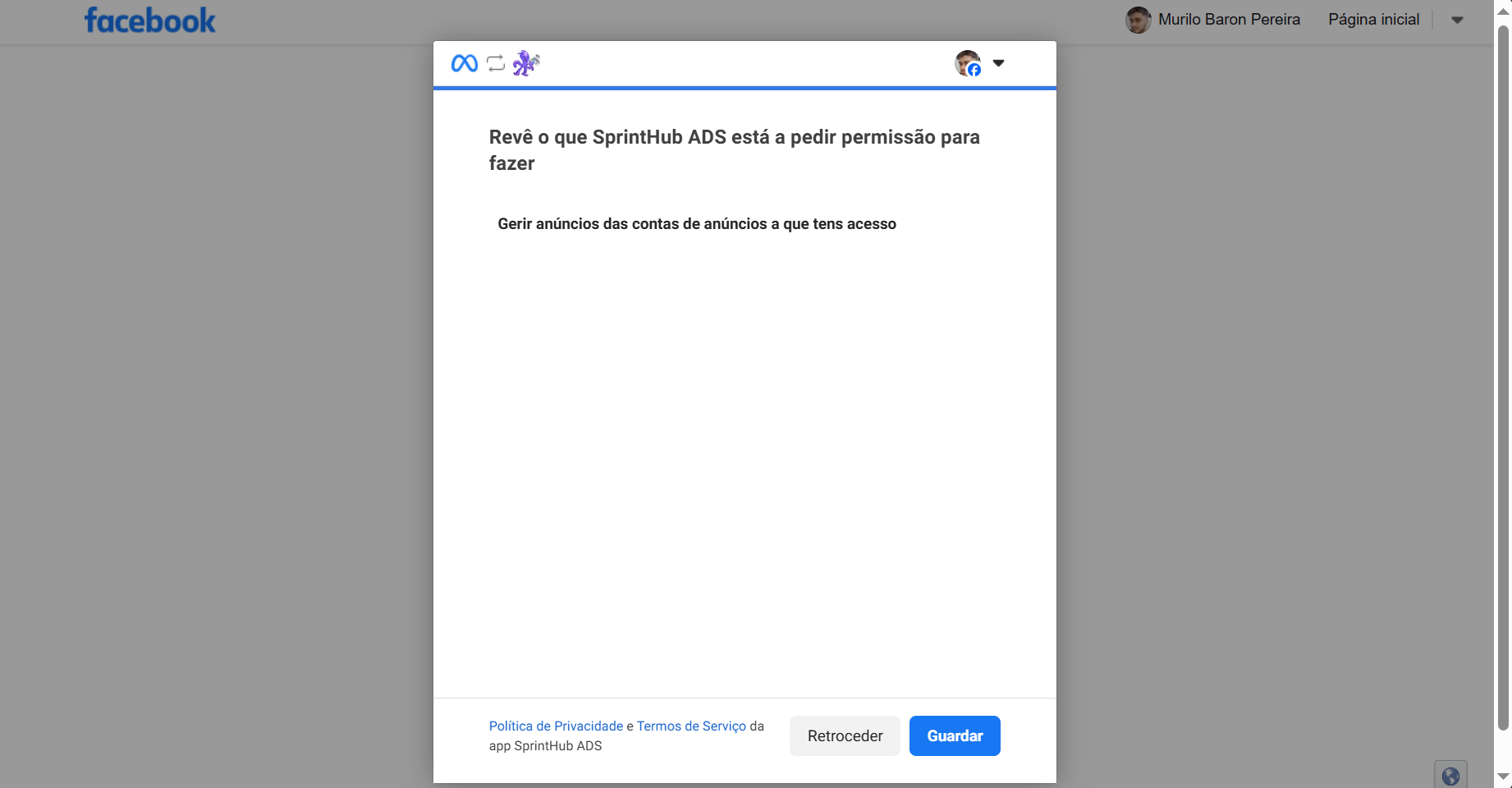
After clicking add account, you will be directed to a page asking whether you allow SprintHub to access your Ads Manager information.
By clicking save, we will return to SprintHub, where it will ask which account you want to add, and then it will be saved as shown in the next image.
### Integration benefits
After the account is connected, it is possible to view the Ads Manager information in two different tabs, one being ad insights and the other campaign planner.
### Ad Insights (Meta)
Within the campaigns menu, you can view which campaigns are currently active and what statistical information shows how they are performing; see the image below.
Campaigns
Statistics view
{% hint style="warning" %}
Below is the manager screen, showing that ads that are not inactive or are drafts will not appear in SprintHub.
{% endhint %}
### Leads that were already in a campaign before the connection
It is not possible to recover leads retroactively through the integration alone. However, you can export them from Meta and import them into SprintHub. To do this, follow the steps below:
* Export the Leads in the Meta Dashboard:
{% embed url="" %}
* Import the Leads into SprintHub:
{% content-ref url="/pages/0d80b5cccc0c9dd54ddc3b99d27a72f74cc1add4" %}
[Contacts - How to Import a Spreadsheet](/en/topics/general/contacts/leads-common-questions/contacts-how-to-import-a-spreadsheet.md)
{% endcontent-ref %}
### Campaign Planner
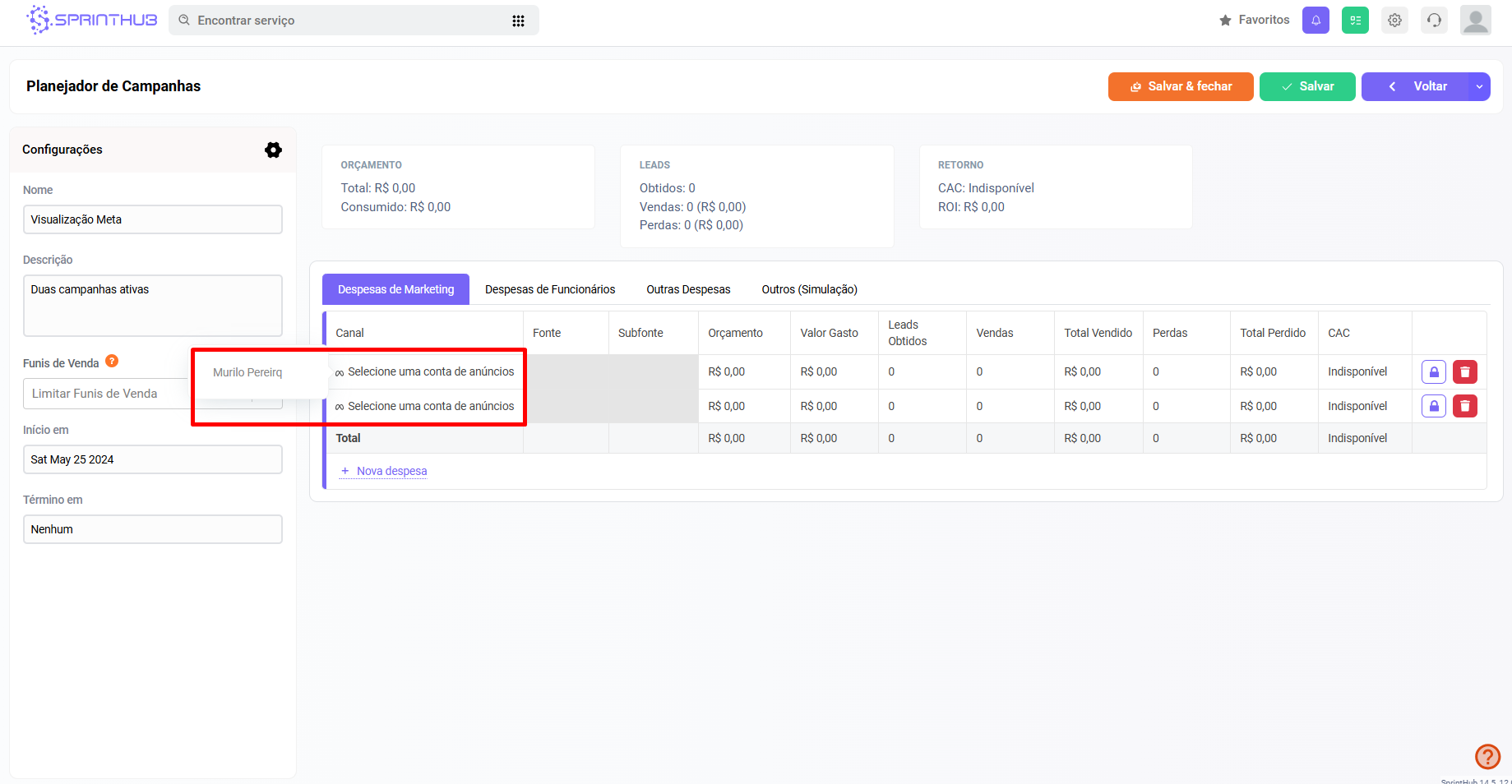
Now, within the campaign planner, when creating a new dashboard and setting the name, description, start, and end dates, we can register a new expense, which will open a window asking whether you want to pull this information directly from Meta.
Screen - registering a new expense
When creating the new expense, the first thing the system asks is which account you want to view this information from.
Right after that, which campaign you want to view.
Once that is done, as you add more, the dashboard above is updated, showing information such as budget, gained leads, lost leads, etc.
If you have more questions about the campaign planner, we have a link below to another article within the knowledge base.
{% embed url="" %}
---
# Agent Instructions
This documentation is published with GitBook. GitBook is the documentation platform designed so that both humans and AI agents can read, navigate, and reason over technical content effectively. Learn more at gitbook.com.
## Querying This Documentation
If you need additional information that is not directly available in this page, you can query the documentation dynamically by asking a question.
Perform an HTTP GET request on the current page URL with the `ask` query parameter, and the optional `goal` query parameter:
```
GET https://docs.sprinthub.com/en/topics/system-settings/account-settings/facebook-ads-manager.md?ask=&goal=
```
`ask` is the immediate question: it should be specific, self-contained, and written in natural language.
`goal` is optional and describes the broader end goal you are ultimately trying to accomplish on behalf of the user. GitBook uses it to tailor the answer towards what is most useful for that goal.
The response will contain a direct answer to the question and relevant excerpts and sources from the documentation.
Use this mechanism when the answer is not explicitly present in the current page, you need clarification or additional context, or you want to retrieve related documentation sections.