> For the complete documentation index, see [llms.txt](https://docs.sprinthub.com/llms.txt). Markdown versions of documentation pages are available by appending `.md` to page URLs; this page is available as [Markdown](https://docs.sprinthub.com/en/topics/relate/email/email-marketing-text-types.md).
# Email Marketing - Text Types
At SprintHub, you can boost your marketing strategies by using emails. This powerful tool offers ready-made templates that make it easy to create effective and impactful campaigns, as well as allowing complete customization of emails from scratch, meeting your specific needs and goals.
* To learn more about email marketing [click here](https://docs.sprinthub.com/topicos/relacionar/e-mail/e-mail-marketing).
* To learn more about ready-made templates [click here](https://docs.sprinthub.com/duvidas-comuns/template/emails-template).
Within email creation, there are different types of text. In this article, we will explain the difference between them so that you can improve your marketing strategies more effectively.
See the different types of text below:
In the menu, go to Email, click + New, and click “Open Builder”.
In this first example, we added “Text.” This allows the insertion of simple, non-customizable text.
### Dynamic Text
This type of text allows the insertion of text variations based on some filter. In the example below, we added a variation based on the form submitted by the lead. When the lead submits the form indicated in the dynamic email filter, they will receive this email variation.
Check it out below:
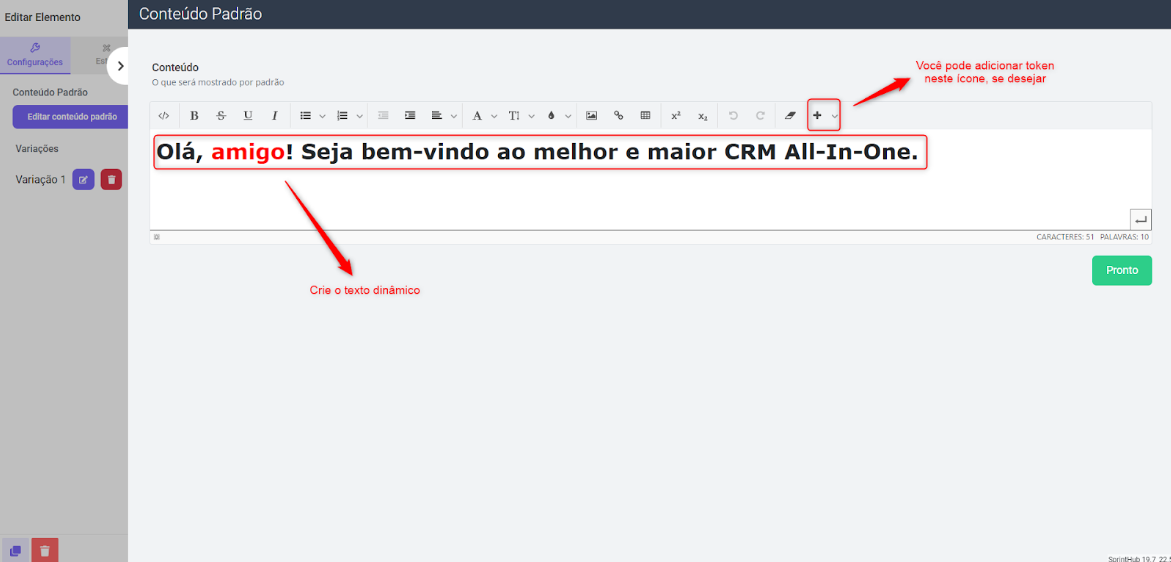
By clicking on “Edit default content,” create the text and customize it if you prefer. You can also add tokens by clicking the + icon\
The word “friend” highlighted in red is our main email.
Add a variation of this email by clicking the icon indicated below:
Add the variation according to the filter “The lead submitted the form” >> Specify the form
Save the configuration.
### Composite Text
Unlike dynamic text, composite text allows text customization, with the addition of colors, different fonts, and tokens as well, but without the filter and variation function.
---
# Agent Instructions
This documentation is published with GitBook. GitBook is the documentation platform designed so that both humans and AI agents can read, navigate, and reason over technical content effectively. Learn more at gitbook.com.
## Querying This Documentation
If you need additional information that is not directly available in this page, you can query the documentation dynamically by asking a question.
Perform an HTTP GET request on the current page URL with the `ask` query parameter, and the optional `goal` query parameter:
```
GET https://docs.sprinthub.com/en/topics/relate/email/email-marketing-text-types.md?ask=&goal=
```
`ask` is the immediate question: it should be specific, self-contained, and written in natural language.
`goal` is optional and describes the broader end goal you are ultimately trying to accomplish on behalf of the user. GitBook uses it to tailor the answer towards what is most useful for that goal.
The response will contain a direct answer to the question and relevant excerpts and sources from the documentation.
Use this mechanism when the answer is not explicitly present in the current page, you need clarification or additional context, or you want to retrieve related documentation sections.