> For the complete documentation index, see [llms.txt](https://docs.sprinthub.com/llms.txt). Markdown versions of documentation pages are available by appending `.md` to page URLs; this page is available as [Markdown](https://docs.sprinthub.com/en/topics/general/tasks/crm/crm-create-task-in-the-opportunity-tab.md).
# CRM - Create task in the Opportunity tab
No **SprintHub CRM**, you can create tasks directly within the **Opportunity**, ensuring that no important action is left out of the sales process. 💼✨
***
### ▶️ Step-by-step guide to creating the task
1. **Open the CRM**
* Through the menu **Find Services** → **GENERAL** → **CRM**
* Or simply type **CRM** in the search 🔎
2. Select the **Desired opportunity**.
3. Click on the tab **Tasks** ➕.
4. Press **Create Task**.
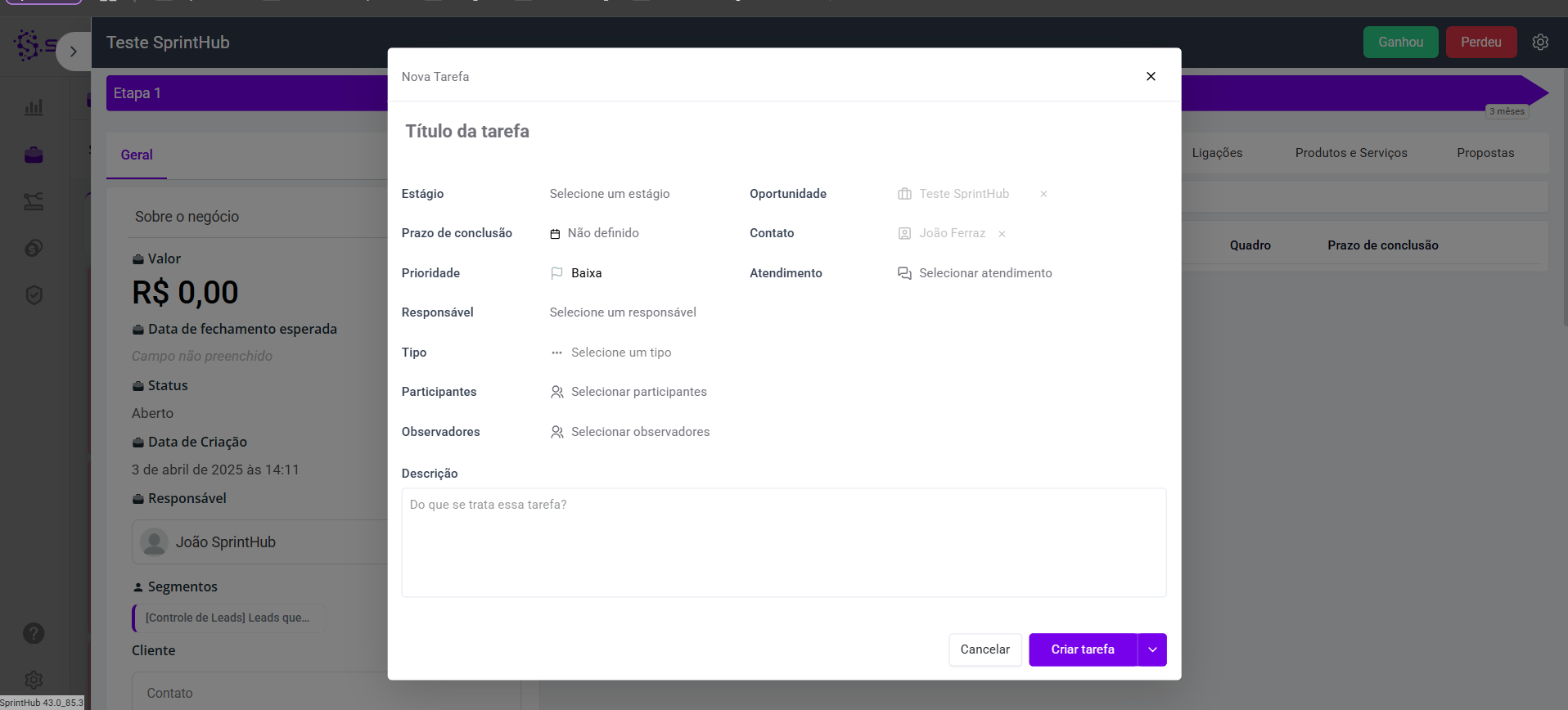
5. Fill in the fields as shown on the screen:
***
### 📝 New Task Fields
* **🏷️ Task Title** → Clear and objective name.\
👉 *Ex.: “Send quote”*.
* **📊 Stage**\
Define which stage the task is in:
* **Open** → task created, not started yet.
* **Pending** → in progress, awaiting completion.
* **Custom** → according to the stages you configured in your **task board**.
* **📅 Completion Deadline** → Define by when it should be done.\
👉 *Ex.: 15/09/2025*.
* **⚡ Priority** → Low, Medium or High.\
👉 Use **High** for urgent tasks.
* **👤 Responsible** → Who on the team will carry it out.
* **📌 Type** → Classify: **Call**, **Meeting**, **Email**.
* **👥 Participants** → Who will collaborate in the execution.
* **👀 Observers** → Who will only follow the progress.
* **📂 Opportunity** → Filled in automatically.
* **🧑💼 Contact** → Linked client.
* **💬 Service** → Link it to a service, if necessary.
* **🖊️ Description** → Add extra details.\
👉 *Ex.: “Confirm receipt of the proposal and schedule an alignment meeting”*.
{% embed url="" %}
***
### ✅ Quick tips
✨ Always define **Owner + Completion Deadline** → ensures control and agility.\
📌 Use **Priority** to differentiate urgency.\
📝 Put effort into the **Description** so that everyone understands the task.
***
### 🎯 Conclusion
Creating tasks within the Opportunity in the CRM helps keep the team organized, ensures that no action is forgotten, and brings more efficiency to the sales funnel. 🚀