# SAC 360° - Service after 24h

<figure><img src="/files/812afa10de886b5a62b15f6be9bb3a7600dc6bcc" alt=""><figcaption></figcaption></figure>

Within SAC 360°, it is possible to recover interactions older than the 24-hour period. We will explain the step-by-step process below.

{% hint style="danger" %}
Reminder: When performing the "Message Template" procedure, you can keep the conversation open, and when the lead responds, the conversation will be available again.
{% endhint %}

When the conversation shows this message and was made via WhatsApp API, it is possible to perform the following procedure:<br>

<figure><img src="/files/1f1df4bc63febc0fc8bd9ac5eefeebc709e5a08f" alt=""><figcaption></figcaption></figure>

By clicking **"Message Templates"**, you can either use an existing template or register a **"New Template"**.

<figure><img src="/files/9e5fb34fd0aa5aeb6d713c5f305c140bffa71f28" alt=""><figcaption></figcaption></figure>

**"Name":** Set a name for the template to help identify it easily. Spaces, uppercase letters, accents, or special characters (except \_) are not allowed.

**"Interactive Message Template":** If you check this option, you are required to add action buttons. When sent, Meta approval is not necessary. This template will not work **outside** the 24-hour window, however, interactive message templates are not charged.

<figure><img src="/files/5698d1668c5d5cac2fca6b0064abd029fbcef83e" alt=""><figcaption></figcaption></figure>

**"Language":** Which language would you like to use.

**"Category":** We would have the three options below:\
\
![](/files/a11484d5688566ee72d6364caf9fffae68ce60a9)

**"Header":** We have four options for more effective use.

<figure><img src="/files/41896f06098f9046e129e2c2afae2e3f2d365652" alt=""><figcaption></figcaption></figure>

<figure><img src="/files/748315d101daf80008effd2e56cafe618c9a2fb3" alt=""><figcaption></figcaption></figure>

<figure><img src="/files/628d544b0362968dc32df13e3da895abba1c59d9" alt=""><figcaption></figcaption></figure>

<figure><img src="/files/5a7ca904e6587c0a53cf68109fcefcc9403afb58" alt=""><figcaption></figcaption></figure>

**"Body":** You can put your message text:

<figure><img src="/files/5c5258d0470ff902b9bd51df86c83efde7cf818a" alt=""><figcaption></figcaption></figure>

<figure><img src="/files/913672cd5df4a0c59fd056839e632a6cc49dc1be" alt=""><figcaption></figcaption></figure>

**"Footer":** Use the footer to add extra information at the end of the message.

<figure><img src="/files/298211efbceaee881a9e8cff7fbdace3effd80c0" alt=""><figcaption></figcaption></figure>

<figure><img src="/files/b9d2111dfbfa0687dbf3d7031b6c9293ab6414b6" alt=""><figcaption></figcaption></figure>

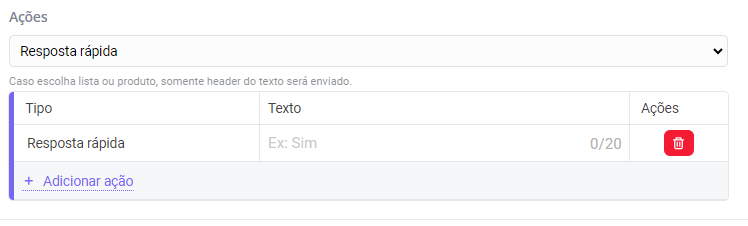
**"Actions":** If you choose list or product, only the text header will be sent.

<figure><img src="/files/f124bf7aa69c8a69ad30f49b396451d71908d804" alt=""><figcaption></figcaption></figure>

<figure><img src="/files/153d43233892048ebc6dacdd33a5af230f5b2d34" alt=""><figcaption></figcaption></figure>

After performing the procedure above, just click "Send for Approval"&#x20;

<figure><img src="/files/7d6cd4884a70153b2683b29426b20585b2077b07" alt=""><figcaption></figcaption></figure>

On the main templates screen, you can view all your templates and drafts, check their statuses, and perform actions such as send, edit, or remove.

<figure><img src="/files/770f6cc743cee68b58477da18b0814a4cd77b4a1" alt=""><figcaption></figcaption></figure>

{% hint style="danger" %}
Remember that Instagram and Facebook "Message Templates" are in Production!
{% endhint %}

{% embed url="<https://docs.sprinthub.com/duvidas-comuns/templates-de-mensagens/quais-sao-os-motivos-que-levam-a-rejeicao-de-um-template>" %}

{% embed url="<https://docs.sprinthub.com/duvidas-comuns/templates-de-mensagens/qual-e-o-prazo-medio-para-a-aprovacao-de-um-template>" %}


---

# Agent Instructions: Querying This Documentation

If you need additional information that is not directly available in this page, you can query the documentation dynamically by asking a question.

Perform an HTTP GET request on the current page URL with the `ask` query parameter:

```
GET https://docs.sprinthub.com/en/topics/general/sac-360/sac-360-common-questions/sac-360-support-after-24h.md?ask=<question>
```

The question should be specific, self-contained, and written in natural language.
The response will contain a direct answer to the question and relevant excerpts and sources from the documentation.

Use this mechanism when the answer is not explicitly present in the current page, you need clarification or additional context, or you want to retrieve related documentation sections.