> For the complete documentation index, see [llms.txt](https://docs.sprinthub.com/llms.txt). Markdown versions of documentation pages are available by appending `.md` to page URLs; this page is available as [Markdown](https://docs.sprinthub.com/en/topics/convert/chatbot/chatbot-common-questions/chatbot-transferring-to-a-human-agent-with-chatgpt.md).
# Chatbot - Transferring to a human agent with ChatGPT
How to use the early exit condition to transfer a support case.
## Configuring the chatbot with the GPT model
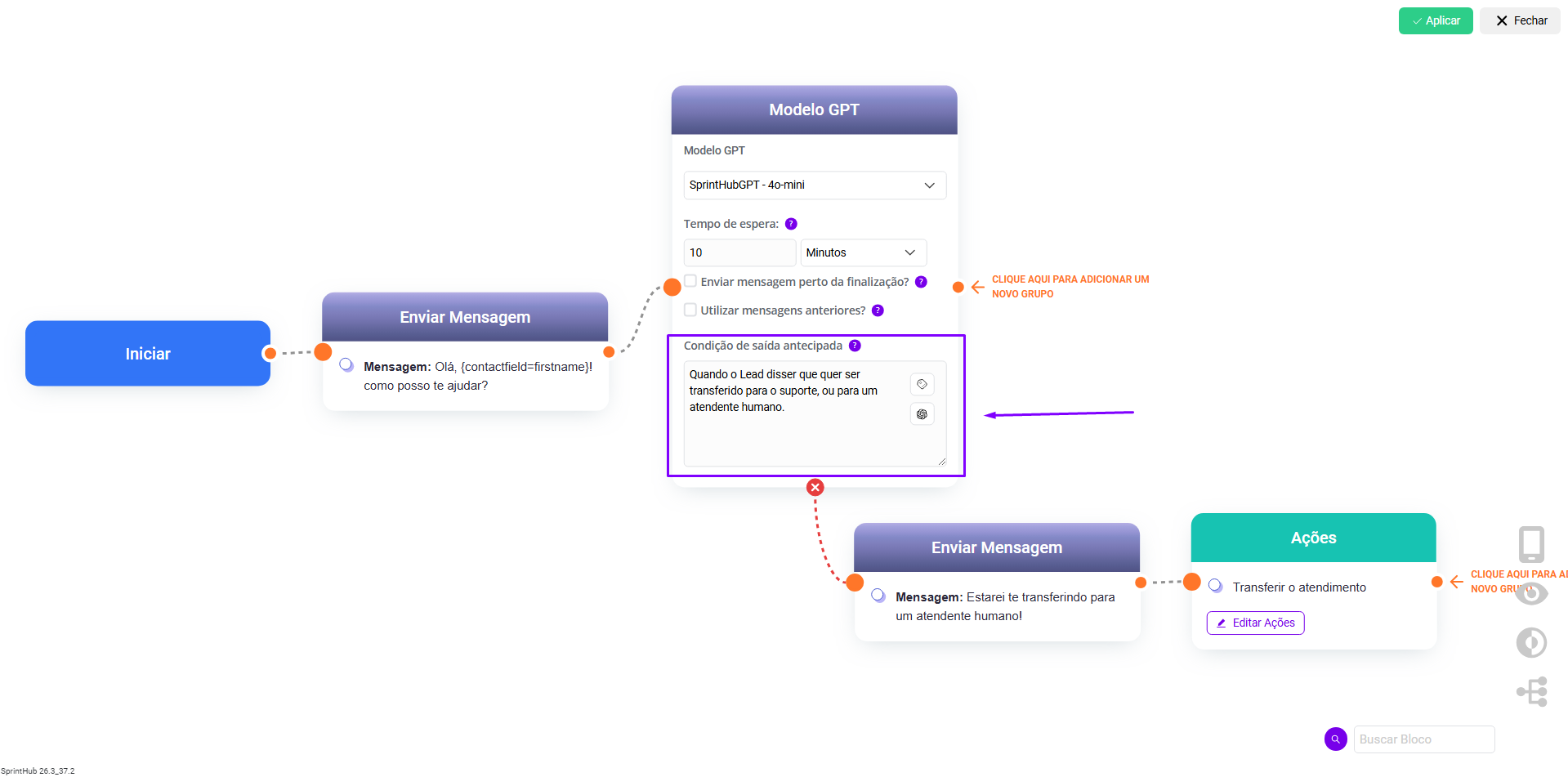
For example, a chatbot was developed with the following configuration:
1. An initial message is sent to the lead;
2. The GPT Model is triggered, observing and responding to the lead based on its [training](/en/topics/artificial-intelligence/ai-agents/legacy-ai-agents-notice/chatgpt-models/chatgpt-models-website-and-text.md). If the early exit condition is identified, the agent will be terminated, and the flow will proceed to the negative output located below the block;
3. The lead will receive a message informing them that the support will be transferred;
4. The support will then be transferred through an action, and can be directed to a specific user or someone within the desired department.