> For the complete documentation index, see [llms.txt](https://docs.sprinthub.com/llms.txt). Markdown versions of documentation pages are available by appending `.md` to page URLs; this page is available as [Markdown](https://docs.sprinthub.com/en/topics/convert/chatbot/chatbot-common-questions/chatbot-follow-up.md).
# Chatbot - Follow-up
## INTRODUCTION
It is common for many customers to start a conversation with you, but then stop responding even before the pre-service stage. Some simply disappear after the first interaction, taking up space in the instance and preventing progress toward more complete support. This scenario creates rework with manual follow-up attempts and reduces the efficiency of automated support.
With well-defined follow-up strategies in the chatbot, it is possible to re-engage these leads automatically and strategically, increasing conversion chances and optimizing system usage.
***
## DEFINING THE CHATBOT ACTIVATION TRIGGER
Before creating the chatbot, it is necessary to define how it will be activated. This activation can occur by a support stage, by an AI agent, manually, or through a segment.
In this tutorial, the example will be based on a stage of the SAC funnel called **“Pre-service”**. Therefore, first of all, it will be necessary to **create a SAC automation**, which will be responsible for triggering the follow-up chatbot according to the defined conditions.
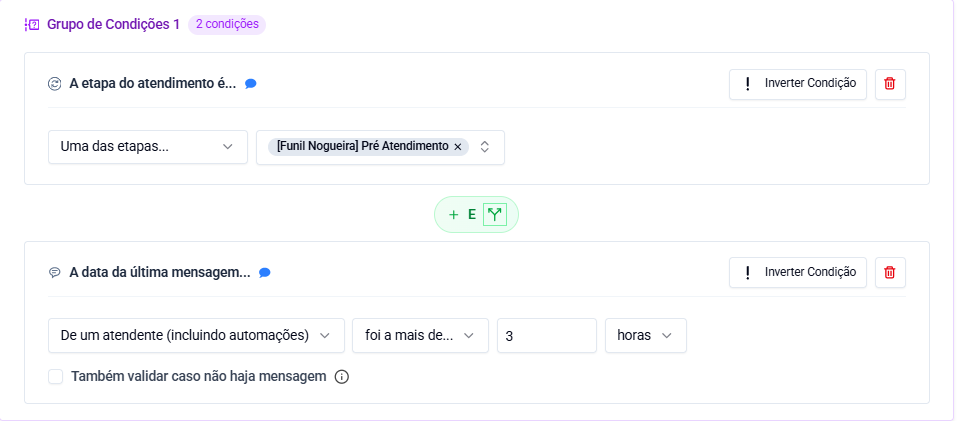
The conditions for activating the chatbot will be:
* The support stage is: “Pre-service”.
* The date of the last message sent by an attendant (including automations) was more than: a period defined by you ago.
When these conditions are met, the actions performed will be:
* Start the chatbot.
* Change the support stage.
**You can view an example of this configuration in the images below.**
SAC Automation Conditions
SAC Automation Actions
***
## FOLLOW-UP CHATBOT STRUCTURE
Now we will build the chatbot responsible for sending the follow-up messages.
This chatbot will consist of 4 stages, each containing at least 4 blocks. The block structure will always follow the same order.
***
**BLOCK 1 – QUESTION BLOCK**
Message:\
Hi, how are you? I noticed that we were unable to continue our conversation. Can I help you with any questions?
Waiting time: 12 hours\
Expected response type: text
The purpose of this block is to make the first contact with the customer, trying to reactivate the conversation.
If the customer responds during the waiting time, the **positive path**will be triggered, which will direct to the **Block 4**.
If the customer does not respond by the end of the waiting time, the **negative path**will be triggered, which will direct to the **Block 2**.
***
**BLOCK 2 – MODIFY CONTACT TAGS**
Action: Modify contact tags
This block is responsible for adding a tag to the contact. In this example, the tag “First contact” will be used. This step is optional, but the tag must have been created beforehand.
***
**BLOCK 3 – WAIT BLOCK**
Action: Wait
Example settings:
* Wait: 1 minute
* Allowed time: 8 AM to 6 PM
* Allowed days: Monday to Friday
This block ensures that the next message is sent only during business hours and on weekdays, avoiding contacts at inappropriate times.
***
**BLOCK 4 – START AI AGENT**
Action: Start AI agent
This block defines what happens if the customer responds. You can direct the support to an AI agent, notify a team member, or perform another action according to your process. In this example, an AI agent will be used.
{% hint style="info" %}
You can view an example of these settings in the images below.
{% endhint %}
***
**REPETITION OF FOLLOW-UP STAGES**
After the first stage, you will need to repeat this same structure for **two more times**, creating new follow-up stages. The stages will have the same blocks and the same logic, with adjustments only in specific settings.
The main change will be in Block 1 (Question block), specifically in the waiting time and the message sent:
* First stage: waiting time of 12 hours.
* Second stage: waiting time of 2 days.
* Third stage: waiting time of 7 days.
In addition to the waiting time, the Question block message must be different in each stage. Never use the same message, as this reduces the response rate and creates a sense of repetition.
Another block that must be adjusted is Block 2 (Tag block), reflecting the follow-up stage:
* First stage: tag “First contact”.
* Second stage: tag “Second contact”.
* Third stage: tag “Third contact”.
The other blocks, such as the wait block and the start AI agent block, remain the same in all stages.
This organization makes it easier to track leads and allows you to identify which re-engagement attempt the customer is in.
{% hint style="info" %}
You can see an example of this configuration in the images below.
{% endhint %}
Repeated Structure
***
**FINAL BLOCKS OF THE LAST STAGE**
Now we will create the final blocks of the last stage of the flow.
* **BLOCK 1 - CHANGE SUPPORT STAGE**\
\
Action: Change support stage\
\
This block moves the lead to a specific cold-lead stage in the SAC, making it easier to view contacts who did not interact.
{% hint style="danger" %}
This block is optional. You can use other ways to view and organize your leads.
{% endhint %}
***
* **BLOCK 2 - MODIFY CONTACT TAGS**\
\
Action: Modify contact tags\
\
This block indicates that we are making the fourth contact with the customer.
***
* **BLOCK 3 - QUESTION BLOCK**\
\
Message:\
Before ending the support, I wanted to confirm whether you wish to continue. If you need anything, I can help.\
\
Waiting time: 7 days\
Expected response: text
This will be the last message sent to the lead, informing them that support will be closed if there is no response.
***
**If the lead does not respond, the flow will follow the negative exit.**
* **BLOCK 4 - MODIFY CONTACT TAGS**\
\
Action: Modify contact tags\
\
Application of the tag “Cold lead”, indicating a complete lack of interaction.
***
* **BLOCK 5 - END LEAD SUPPORT**\
\
Action: End support\
\
This block officially closes the support.
***
* **BLOCK 6 - ARCHIVE THE LEAD**\
\
Action: Archive the lead\
\
The lead will be archived to avoid a buildup of inactive contacts in the instance, keeping the environment organized.
***
**If the lead responds, the flow will follow the positive exit.**
* **BLOCK 4 – START AI AGENT**\
\
Action: Start AI agent\
\
The agent will continue the support with the lead.
***
## CONCLUSION
After completing all these blocks, your follow-up chatbot will be ready. Remember to customize times, messages, tags, and actions according to your business reality. This article serves as a reference base for creating and adapting your own model.
{% hint style="info" %}
You can see an example of this configuration in the images below.
{% endhint %}