> For the complete documentation index, see [llms.txt](https://docs.sprinthub.com/llms.txt). Markdown versions of documentation pages are available by appending `.md` to page URLs; this page is available as [Markdown](https://docs.sprinthub.com/en/topics/analyze/integrated-webhooks/integrated-webhooks-common-questions/integrated-webhooks-using-broadcast-to-manage-opportunities.md).

# Integrated Webhooks - Using broadcast to manage opportunities

In this broadcast use example, a webhook was created that adds to the lead the products they buy in an e-commerce store, through custom objects, and then updates their stage in the CRM.

### General concept of broadcast

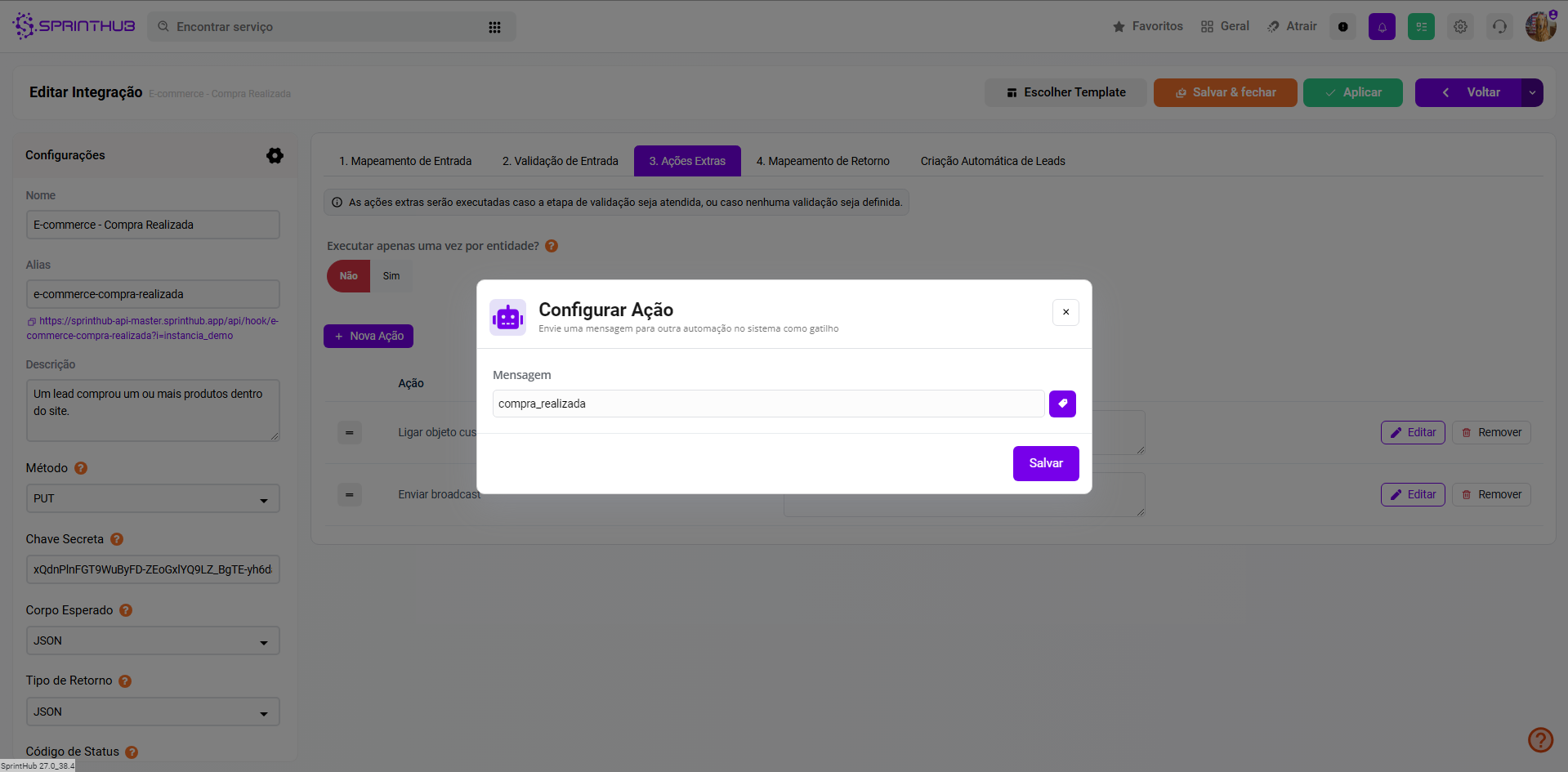
Broadcast in Sprinthub is a signal that can be sent and received at different points in the platform, always related to a lead. In an automation, a broadcast must be emitted (by an action) and, at another point, received (as a trigger). Currently, broadcast triggers and actions are available in CRM automations, SAC 360°, chatbots, and automation flows.

## Store funnel - creating stage automation

The goal is that, when the lead registered on the website completes an order, a broadcast is sent and received in the CRM, triggering a stage automation. This automation uses the event 'Broadcast received' as its trigger and changing the opportunity funnel/stage as its action. Upon receiving the webhook signal, the identified lead, if it has an opportunity in the 'Registered Leads' stage, will have its opportunity moved to the 'Active Customers' stage.

<figure><img src="https://684109703-files.gitbook.io/~/files/v0/b/gitbook-x-prod.appspot.com/o/spaces%2F9FzUKkagBNy5uQ7AtGNa%2Fuploads%2FzcVBgNrV0tf91rWF9iJv%2Fcrm_1.png?alt=media&amp;token=512c398f-a056-4582-a72b-c856eae5304e" alt=""><figcaption><p><em>E-commerce funnel.</em></p></figcaption></figure>

<figure><img src="https://684109703-files.gitbook.io/~/files/v0/b/gitbook-x-prod.appspot.com/o/spaces%2F9FzUKkagBNy5uQ7AtGNa%2Fuploads%2FEW3xrI3jsnpfYVRoPd65%2Fcrm_2.png?alt=media&amp;token=c15aa858-39d9-4e4f-9b80-ce69d860d964" alt=""><figcaption><p><em>Stage automation.</em></p></figcaption></figure>

<figure><img src="https://684109703-files.gitbook.io/~/files/v0/b/gitbook-x-prod.appspot.com/o/spaces%2F9FzUKkagBNy5uQ7AtGNa%2Fuploads%2FmCtDAYsk8715aBlqTGMU%2Fcrm_3.png?alt=media&amp;token=32433eb8-b62d-46d7-8ecb-c7ed9e2364ff" alt=""><figcaption><p><em>Configuration of the 'Receive Broadcast - Purchase' stage automation.</em></p></figcaption></figure>

## Completed purchase webhook

As an example, a webhook was created and mapped to expect basic order data, such as the cart containing the products, their prices and names, the buying customer's name, and their email and WhatsApp.&#x20;

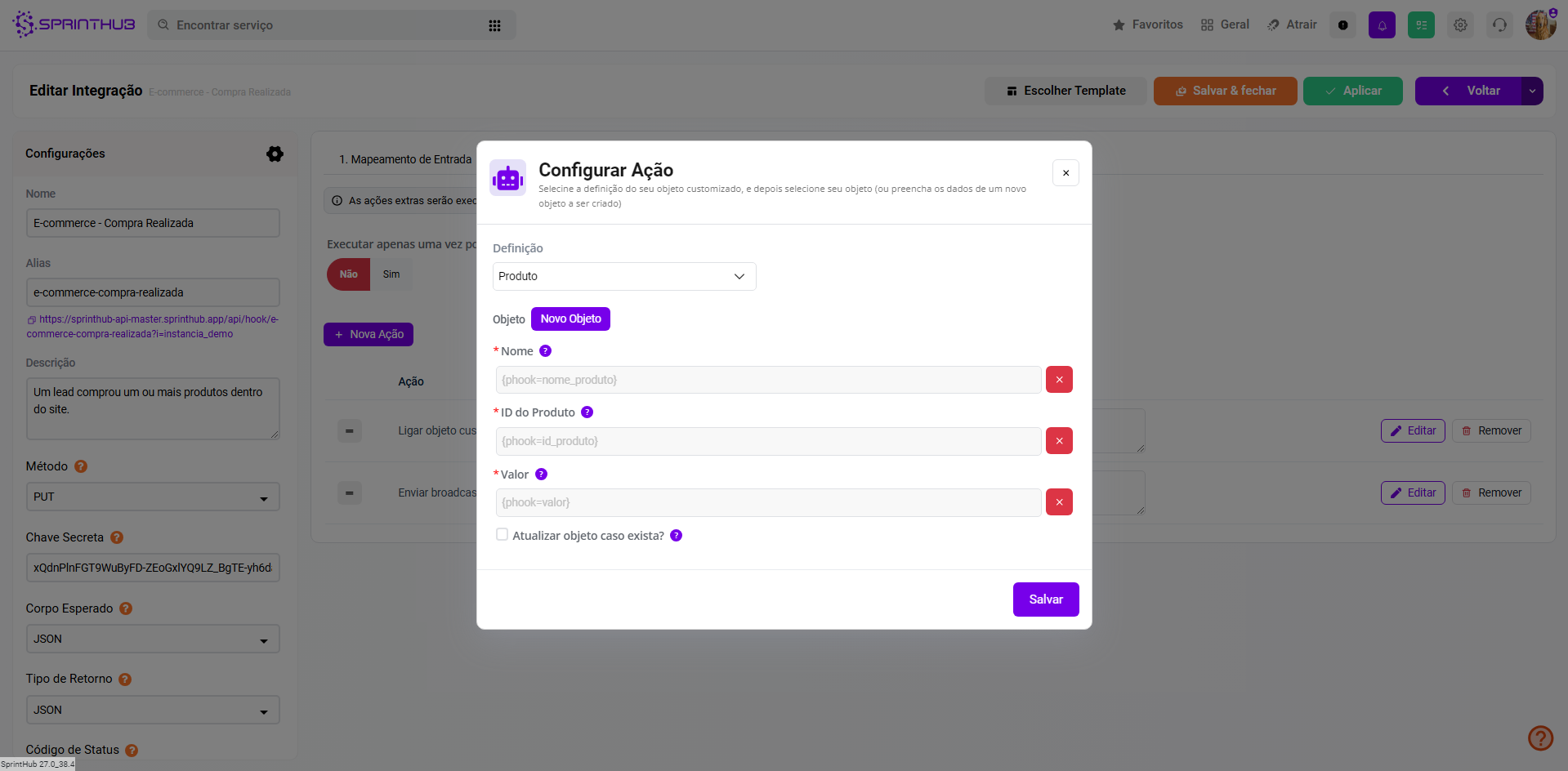
The cart is mapped as a list of objects, allowing multiple custom objects to be created for the lead through extra actions, one for each item in the list.&#x20;

The 'Identify By' field with WhatsApp will be used to identify the lead (if it already exists) on the platform through its WhatsApp number.

<figure><img src="https://684109703-files.gitbook.io/~/files/v0/b/gitbook-x-prod.appspot.com/o/spaces%2F9FzUKkagBNy5uQ7AtGNa%2Fuploads%2FTg630A6MF4uYfuZyaWBe%2Fwebhook_1.png?alt=media&amp;token=0912a3a7-5398-4f2c-87be-439acd699c1c" alt=""><figcaption><p><em>Webhook mapping.</em></p></figcaption></figure>

<figure><img src="https://684109703-files.gitbook.io/~/files/v0/b/gitbook-x-prod.appspot.com/o/spaces%2F9FzUKkagBNy5uQ7AtGNa%2Fuploads%2F8trMAlMpFYYP0iJWBJU4%2Fcrm_lista_objetos.png?alt=media&amp;token=dc1f01a2-eb4c-4d80-af34-661d95c08a0e" alt=""><figcaption><p><em>Cart object list mapping.</em></p></figcaption></figure>

<figure><img src="https://684109703-files.gitbook.io/~/files/v0/b/gitbook-x-prod.appspot.com/o/spaces%2F9FzUKkagBNy5uQ7AtGNa%2Fuploads%2FE0fgaBF1x7QOUNPe51Uq%2Fwebhook_2.png?alt=media&amp;token=9e3aef2b-03d2-4c8b-b2d6-99606098a32a" alt=""><figcaption><p><em>Webhook Extra Actions.</em></p></figcaption></figure>

<figure><img src="https://684109703-files.gitbook.io/~/files/v0/b/gitbook-x-prod.appspot.com/o/spaces%2F9FzUKkagBNy5uQ7AtGNa%2Fuploads%2Fu6U2DNZ7FGaKFSiRDS80%2Fwebhook_3.png?alt=media&amp;token=b72b9a14-3b3d-4fd3-9959-7281020fcdc6" alt=""><figcaption><p><em>Webhook Extra Actions - Link custom object.</em></p></figcaption></figure>

<figure><img src="https://684109703-files.gitbook.io/~/files/v0/b/gitbook-x-prod.appspot.com/o/spaces%2F9FzUKkagBNy5uQ7AtGNa%2Fuploads%2FizyhKizTfDiLUVW1gZ7X%2Fwebhook_4.png?alt=media&amp;token=a3a44af2-3df6-4dda-b0bf-254585175f51" alt=""><figcaption><p><em>Webhook Extra Actions - Send broadcast.</em></p></figcaption></figure>

## Simulating a purchase trigger

As an example, the following trigger will be performed using the Postman software, in the mapped format above.

<figure><img src="https://684109703-files.gitbook.io/~/files/v0/b/gitbook-x-prod.appspot.com/o/spaces%2F9FzUKkagBNy5uQ7AtGNa%2Fuploads%2FGtaQFxJmdQ5Dbnfv3TYw%2Fpostman_1.png?alt=media&amp;token=b214faad-7e90-416a-99bc-1b468de63db6" alt=""><figcaption><p><em>Request made through Postman.</em></p></figcaption></figure>

## Purchase trigger result

We can verify the result of the automations by checking whether the lead was moved to a stage, received the message, and correctly executed the webhook, through the lead history.

<figure><img src="https://684109703-files.gitbook.io/~/files/v0/b/gitbook-x-prod.appspot.com/o/spaces%2F9FzUKkagBNy5uQ7AtGNa%2Fuploads%2FQyeaW9t7LtRcuHzyn1sq%2Fcrm_4.png?alt=media&amp;token=cf67f5e3-8b1a-41ac-a696-8d3bb98980b7" alt=""><figcaption><p><em>Lead in the Active Customers stage.</em></p></figcaption></figure>

<figure><img src="https://684109703-files.gitbook.io/~/files/v0/b/gitbook-x-prod.appspot.com/o/spaces%2F9FzUKkagBNy5uQ7AtGNa%2Fuploads%2FzMclxm5wd4LevushUHhj%2Fcrm_5.png?alt=media&amp;token=3d98b2cf-6f06-4c26-95fc-8397c896645b" alt=""><figcaption><p><em>Lead history, containing the webhook execution, the broadcast sending</em><br><em>and the actions configured in the stage automation.</em></p></figcaption></figure>

<figure><img src="https://684109703-files.gitbook.io/~/files/v0/b/gitbook-x-prod.appspot.com/o/spaces%2F9FzUKkagBNy5uQ7AtGNa%2Fuploads%2FaR8FCyHLBxSuc4J17J6V%2Fcrm_6.png?alt=media&amp;token=39cdd1d8-195d-4d17-bd6d-d8637d8e3771" alt=""><figcaption><p><em>Created custom Product objects.</em></p></figcaption></figure>


---

# Agent Instructions
This documentation is published with GitBook. GitBook is the documentation platform designed so that both humans and AI agents can read, navigate, and reason over technical content effectively. Learn more at gitbook.com.

## Querying This Documentation
If you need additional information that is not directly available in this page, you can query the documentation dynamically by asking a question.

Perform an HTTP GET request on the current page URL with the `ask` query parameter, and the optional `goal` query parameter:

```
GET https://docs.sprinthub.com/en/topics/analyze/integrated-webhooks/integrated-webhooks-common-questions/integrated-webhooks-using-broadcast-to-manage-opportunities.md?ask=<question>&goal=<endgoal>
```

`ask` is the immediate question: it should be specific, self-contained, and written in natural language.
`goal` is optional and describes the broader end goal you are ultimately trying to accomplish on behalf of the user. GitBook uses it to tailor the answer towards what is most useful for that goal.

The response will contain a direct answer to the question and relevant excerpts and sources from the documentation.

Use this mechanism when the answer is not explicitly present in the current page, you need clarification or additional context, or you want to retrieve related documentation sections.